

The Upgrade That Almost Wasn't
A field guide to zero-downtime EKS upgrades - told from the trenches

It’s 04:47pm. The control plane upgrade finished twenty minutes ago and everything looks fine. The API server is responding. System pods are healthy. So you move to the node groups - because the runbook says so, and the runbook has always been right.
Then a Slack message from on-call: “ALB stopped routing to the new nodes. Users are hitting 502s.”
You stare at the screen. The nodes are Ready. The pods are Running. The target group shows healthy. And yet.
Forty minutes later, you find it: a node affinity rule, written eight months ago by someone who has since left the team, that was silently excluding the new node group from a critical deployment. The pods were running - just not the right pods, on the right nodes, behind the right load balancer.
No one wrote it down. No runbook covered it. And now you’re explaining a 40-minute degradation to your VP of Engineering at midnight.
I’ve been in that room. This article is everything I wish I’d known before I was.
The Rule Nobody Actually Follows
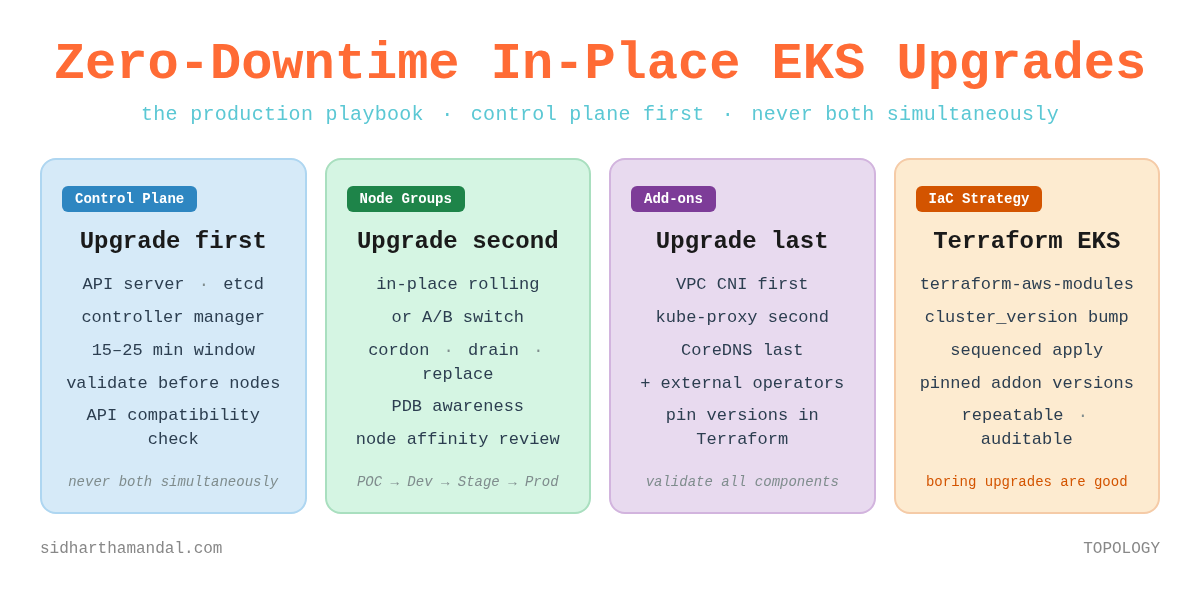
Control plane first. Node groups second. Never both simultaneously.
Say it out loud. It sounds obvious. And yet I have watched teams - smart teams, teams with good intentions - violate this rule constantly. Not out of carelessness, but because their automation was doing something they didn’t fully understand, or because the pressure to “just get it done” overcame the discipline to do it right.
Here’s why the rule exists. AWS guarantees that your kubelets can run up to three minor versions behind the control plane - if your nodes are on 1.25 or newer. A control plane on 1.32 can manage nodes on 1.29. That gap is not a bug - it is a deliberately engineered operating window. It exists to give you time to validate that the control plane upgrade is stable before you touch a single node. One important caveat: if your nodes are still on kubelet 1.24 or older, the older two-version skew applies. If you're running anything current, you're in the three-version world.
Use that window. Don’t race through it because you want to finish before midnight.
The teams I’ve seen upgrade with the least drama are the ones who treat the gap between control plane and node upgrade as intentional breathing room - time for their monitoring to settle, for their operators to reconnect, for them to look at the cluster and ask: does this feel right?
Before You Touch Anything: The Pre-Flight
The most expensive mistakes I’ve witnessed in EKS upgrades didn’t happen during the upgrade. They happened in the days before it, when teams skipped checks they assumed wouldn’t matter.
Check your add-on compatibility matrix
AWS managed add-ons - CoreDNS, kube-proxy, VPC CNI - have specific version compatibility matrices for each Kubernetes minor version. These are not suggestions. If your VPC CNI version is incompatible with the target Kubernetes version, new pods will fail to get network interfaces. New pods means no new capacity. No new capacity during a rolling node upgrade means workloads pile up on draining nodes and your cluster grinds to a halt.
Check this first. Every time.
aws eks describe-addon --cluster-name <cluster> --addon-name coredns
aws eks describe-addon --cluster-name <cluster> --addon-name kube-proxy
aws eks describe-addon --cluster-name <cluster> --addon-name vpc-cni
Hunt your pod disruption budgets
I once spent 90 minutes debugging a node drain that wasn’t moving. The node was cordoned. The drain command was running. Nothing was happening.
A PDB with maxUnavailable: 0 was doing exactly what it was designed to do: refusing to allow any disruption. The PDB was correct for its original purpose. But its original purpose was three months and two team members ago.
Find every PDB in your cluster before upgrade day. Review each one. Ask whether the constraint is still appropriate. Don’t find out mid-drain.
kubectl get pdb -AScan for deprecated API versions
Kubernetes removes APIs that were deprecated two or three versions earlier. You will not get a warning at runtime. Your workloads will simply stop deploying after the upgrade - because the API version they reference no longer exists.
Tools like Pluto or kubent will scan your cluster and flag deprecated API usage before it becomes a 2am problem. Run them. Fix what they find. Then run them again after your fixes to confirm.
Check your headroom
During a rolling node replacement, pods from draining nodes need somewhere to land. If your cluster is running at 85% utilisation with no autoscaling headroom, they have nowhere to go. The upgrade stalls. Nodes queue behind each other waiting for capacity that isn’t coming.
Temporarily bump your node group min size before the upgrade. Or confirm your cluster autoscaler has room to expand. Either way - check before you start, not after you’re stuck.
The Environment Progression: Why You Should Never Upgrade Production First
This is the one practice that has saved me more times than any technical trick.
Never upgrade production first. Always follow the progression:
POC → DEV → STAGE → PROD
Each environment in this chain serves a distinct purpose - and the discipline breaks down the moment you treat any of them as optional.
POC is a temporary environment, spun up specifically to validate the upgrade path. It doesn’t need to mirror production perfectly. What it needs to produce is a runbook. Every decision, every issue, every resolution, written down as you go. The runbook is the primary output of your POC upgrade - not the working cluster.
But there’s a second thing POC must do that most teams skip: validate every unmanaged component against the target version. This is where the real surprises live.
AWS managed add-ons - CoreDNS, kube-proxy, VPC CNI - have compatibility matrices and AWS handles their upgrade path. Your external operators and controllers have no such safety net. The AWS Load Balancer Controller, Karpenter, Cluster Autoscaler, cert-manager, external-dns - each has its own Kubernetes version compatibility matrix, maintained separately, with its own release cadence. None of them will warn you at runtime if they fall out of compatibility. They’ll just start behaving incorrectly, or stop working entirely, in ways that may not be immediately obvious.
POC is where you find this out cheaply. Install every external operator and controller your production cluster runs. Upgrade the cluster. Watch what breaks. Specifically:
Does the AWS Load Balancer Controller still reconcile ingress resources correctly after the upgrade?
Does Cluster Autoscaler still provision and register new nodes?
Does cert-manager still issue and renew certificates?
Does external-dns still sync records?
Do any of your custom operators - the ones your own team wrote - handle the new API versions correctly?
If any of these fail in POC, you have found the issue at the cheapest possible moment - in a temporary cluster, with no users, and no pressure. Document the fix. Pin the compatible version. Add it to the runbook. By the time you reach PROD, you will have validated this component three times across three environments, and its behaviour will be a known quantity.
DEV is your first real-world test. Real engineers use it. Real workload patterns emerge. I’ve seen compatibility issues surface in DEV that never appeared in POC - because real scheduling behaviour, real resource constraints, real network policy interactions only show up with real workloads. Fix the issues. Update the runbook.
STAGE is where you should have no surprises. By this point you’ve done the upgrade twice. The runbook is battle-tested. If something new surfaces in STAGE, that’s a signal - your DEV environment doesn’t match STAGE closely enough. Fix the parity, not just the symptom.
PROD is now a known quantity. The runbook is proven. The team has done this three times already. Muscle memory has replaced anxiety. The outcome is predictable - because you made it predictable.
This progression also solves a problem most teams don’t notice until it bites them: version drift between environments. When DEV is one minor version behind PROD, and STAGE is somewhere in between, your non-production upgrades tell you very little about your production upgrade. The progression - treated as a pipeline, not a one-off event - keeps everything current.
IaC Makes Upgrades Boring (That’s the Point)
The single biggest change in how I think about EKS upgrades came when I started managing clusters entirely through Terraform.
Not because Terraform is magic. Because IaC (Infrastructure as Code) forces you to be explicit about sequencing - and sequencing is where most upgrade failures live.
The terraform-aws-modules/eks module structures your cluster configuration cleanly, but it does not automatically sequence the control plane and node group upgrades for you. A plain terraform apply after bumping cluster_version will kick off both the control plane and node group upgrades in the same operation - which violates the fundamental rule. The sequencing discipline still sits with you.
The pattern that gives you back control is targeted applies. You upgrade the control plane first, validate it completely, then explicitly upgrade node groups as a separate step:
# Step 1: Bump cluster_version in your config, then:
terraform apply -target=module.eks.aws_eks_cluster.this[0]

# Validate - kubectl get nodes, check system pods, confirm stable

# Step 2: Only then, upgrade node groups
-target='module.eks.module.eks_managed_node_group["your-node-group-name"]'
This gives you the validation window the fundamental rule demands. The config change is a single version bump - clean, auditable, reviewable in a PR:
module “eks” {
  source = “terraform-aws-modules/eks/aws”
  version = “~> 21.0”

  cluster_version = “1.32” # was 1.31

  cluster_addons = {
    coredns = { most_recent = true }
    kube-proxy = { most_recent = true }
    vpc-cni = { most_recent = true }
  }
}
The apply is where you exercise the discipline - not the config. One change, two targeted applies, one validation gate in between.
One important nuance: most_recent = true is convenient for initial setup, but production clusters benefit from pinned add-on versions that you’ve explicitly validated. Use most_recent to discover the compatible version, then pin it:
coredns = {
  addon_version = “v1.11.1-eksbuild.4”
}
This prevents an add-on version from changing unexpectedly on a subsequent apply. It gives you explicit control over what changes during an upgrade - which means you can explain every change in your post-upgrade review, because you chose every change.
One thing Terraform does not handle for you: external operators. The AWS Load Balancer Controller, Cluster Autoscaler, cert-manager, external-dns, observability - these live outside the EKS managed add-on umbrella. They need to be upgraded in the same cycle, managed through their Helm chart versions in Terraform or your GitOps tooling. An EKS upgrade is not complete until every component in the cluster - managed and unmanaged - has been validated at the new version.
In-Place vs A/B: Choose Deliberately
I’ve done both. Neither is universally correct. What matters is choosing deliberately and understanding the trade-offs before you’re mid-upgrade.
In-place rolling upgrades
AWS handles the cordon, drain, replacement, and rejoin sequence within the existing node group. Simpler to orchestrate. Lower temporary cost. No DNS complexity. The trade-off: less control over the exact replacement sequence, and no parallel environment to fall back to if something goes wrong mid-upgrade.
In-place works well when your workloads are well-understood, your PDBs are accurate, and you’ve done the pre-flight thoroughly. It’s the approach most teams should start with.
A/B switching
You provision a fully operational target environment alongside the current one, validate completely, then cut over. The rollback is clean: if something is wrong, traffic stays on the original.
At the cluster level, the critical complexity is networking. Your ALB DNS names, ingress endpoints, and load balancer IPs are tied to the original cluster. A new cluster means new load balancers with new DNS names. The cutover sequence is non-negotiable:
Create all resources in the new cluster
Validate end-to-end - every service, every endpoint, every health check
Update DNS records to point to the new endpoints
Only then decommission the old cluster
Cutting DNS before validation is the most common A/B failure mode. I’ve seen it happen. Don’t let it happen to you.
A/B at the node group level
This is often the best of both worlds. Provision a new node group at the target version alongside the existing one. Cordon the old nodes, migrate workloads, validate, remove the old group. You get the rollback safety of A/B without the external DNS orchestration of a full cluster switch.
The networking consideration here moves inward. During the transition, both old and new nodes are active cluster members, and services will route to pods on either. If your workloads use node selectors, affinity rules, or topology spread constraints tied to node group labels - the midnight 502 scenario from the opening - review and update them before migration. Confirm pods are fully healthy on new nodes before removing the old group.
The Upgrade Itself
Upgrading the control plane
AWS manages the underlying upgrade - etcd, API server, controller manager, scheduler. You initiate it; they handle the mechanics. Expect 15–25 minutes.
During this window, the API server will be briefly unavailable as it cycles. Any process making continuous Kubernetes API calls - CI/CD pipelines, operators, monitoring agents - will see transient errors. Well-written operators handle this with exponential backoff and recover automatically. Know which of your operators are well-written before the upgrade, not after.
After the control plane finishes: stop. Validate. Check that all system pods are healthy, all nodes show Ready, nothing is stuck in a restart loop. No node work begins until this check passes.
kubectl get nodes
kubectl get pods -A | grep -v Running | grep -v Completed
Draining nodes
kubectl cordon <node-name>
kubectl drain <node-name> --ignore-daemonsets --delete-emptydir-data --timeout=300s
The --timeout flag is not optional. Without it, a single stuck pod can block the drain indefinitely - and you won’t know until you’ve been waiting long enough to start questioning reality. Set a timeout that’s long enough for graceful shutdown but short enough to surface genuinely stuck pods.
Upgrading add-ons - order matters
Add-on ordering has a wrinkle that catches teams out. VPC CNI is the exception to “add-ons after node groups” - if your current VPC CNI version doesn’t support the target Kubernetes API, new pods will fail to get network interfaces before the control plane upgrade even completes. Check your VPC CNI compatibility first. If it needs updating, upgrade VPC CNI before the control plane, not after.
For everything else, the ordering after node groups is:
kube-proxy first - it manages service routing rules on each node
CoreDNS last - DNS failures are visible but degrade more gracefully than networking failures
The complete sequence, when VPC CNI needs a pre-upgrade bump, looks like this: VPC CNI → control plane → node groups → kube-proxy → CoreDNS → external operators
VPC CNI handles pod networking. An incompatible version means new pods fail to get network interfaces. That’s upstream of everything else. kube-proxy manages service routing rules on each node. CoreDNS failures are visible and disruptive, but DNS can degrade gracefully in ways that networking cannot - hence the ordering.
Then: external operators. Every one of them, in the same planned window. Not as an afterthought. Not next week. An EKS upgrade is not complete until every component has been validated at the new version.
The Rollback Question (And Why It’s the Wrong Question)
Teams ask me: what’s the rollback plan for the control plane?
There isn’t one. In-place EKS upgrades cannot be rolled back. Once the control plane is upgraded, it stays upgraded. This is not a limitation to work around - it is the most important thing to communicate to your team before you begin.
The question to ask instead: what is our strategy for ensuring the upgrade succeeds?
That strategy is everything in this article. The pre-flight validation. The environment progression. The deliberate ordering. The willingness to stop and investigate rather than push through when something looks wrong.
Add-ons can be rolled back to previous versions even when the cluster version cannot. If a managed add-on update causes issues, roll it back while you investigate. The cluster version is independent.
I’ve seen teams push through warning signs because they were “almost done” and didn’t want to restart the window. That instinct - understandable, human, wrong - is what turns planned maintenance into incidents.
Stop when something looks wrong. Investigate. Decide deliberately. The cluster will wait.
What Separates Teams That Upgrade Confidently
After years of this, I’ve noticed the same patterns in teams that upgrade without drama - and in teams that dread every upgrade cycle.
Automation with gates. Not “run everything and hope” - but scripted upgrade sequences with explicit validation checks between each step. The gate is the discipline. Without it, automation just makes mistakes faster.
Upgrade frequency. Clusters upgraded every minor version are dramatically easier to manage than clusters that skip versions. The diff is smaller. The compatibility surface is narrower. The team stays familiar with the process. EKS supports each minor version for 14 months of standard support, followed by 12 months of extended support - 26 months total if you opt in. A new minor version arrives roughly every four months. That math still produces three or four upgrade cycles per year, but teams on extended support may feel less urgency than they should. Extended support is a cost - both financially and operationally. The longer you defer, the larger the diff, the wider the compatibility surface, and the harder the eventual upgrade. Treat 14 months as your real target window, not 26.
Pre-production parity. If your staging cluster doesn’t resemble production in workload type, node configuration, and add-on versions - your staging upgrade tells you almost nothing about your production upgrade. Parity is the whole point of the progression.
Living runbooks. A written runbook for your specific cluster configuration - updated after every upgrade cycle - is worth more than any generic guide, including this one. It’s what you reach for when something unexpected happens at 11pm. It’s what turns “we’ve done this before” from a feeling into a fact.
Boring Upgrades Are Good Upgrades
The opening story - the 40-minute degradation, the midnight Slack message, the forgotten node affinity rule - didn’t have to happen. It happened because the upgrade process had never been fully documented, because the environment progression was skipped to save time, because the pre-flight checks didn’t include workload-level configuration review.
None of those failures were dramatic. None of them were unavoidable. They were the accumulated cost of treating upgrades as events rather than operations.
The teams I respect most in this space don’t talk about their EKS upgrades. Not because the upgrades are secret - because they’re unremarkable. Planned maintenance window. Environment progression. Proven runbook. Boring outcome.
That’s the goal. Not heroic upgrades. Boring ones.
If this helped you think through your next upgrade, share it with whoever runs your cluster. And if you have a war story of your own - a PDB that blocked you, a node affinity rule that bit you, an add-on that fell out of compatibility mid-window - I’d genuinely like to hear it.
Subscribe for free to receive new posts and support my work - or go paid for early access, deeper dives, and the occasional piece that never goes public.